
Email Channels & Setup
Create a channel address, forward your support inbox to it, and choose where tickets land. How inbound mail becomes a ticket, who a customer's email copies onto it, how replies thread, who a forwarded message is credited to, and what removing an address does.
On this page
- Create a channel address
- Edit an address
- How an email becomes a ticket
- People copied on a customer's email
- How replies thread onto a ticket
- When someone on your team emails or forwards a message in
- Mail from someone on your team
- Opening a ticket for a client by email
- Replying to a customer with the channel address copied
- A forwarded customer email
- When the same email is forwarded more than once
- When a forward is credited to the forwarder instead
- When the customer wrote to a Google Group or mailing list
- Your team's own mailboxes
- Removing a channel address
- Where a ticket actually lands: location overrides
A channel address is the DevStride email address that support requests arrive at. You create one, then set your real support inbox (for example support@yourcompany.com) to forward to it. Customers keep writing to the address they know; DevStride turns what arrives into tickets and sends your replies back over email.
Forwarding is the only setup
There is no DNS or domain verification to do. Mail reaches DevStride through a forwarding rule in your own mail system, and your replies are sent from the channel address with the sender name you choose below. When a staff member replies, the email can also name them, as Jane Doe (Acme Support); see Control what reaches your customers. If you would rather customers see an address on your own domain, such as
support@yourcompany.com, see Sending from your own domain.
Create a channel address#
-
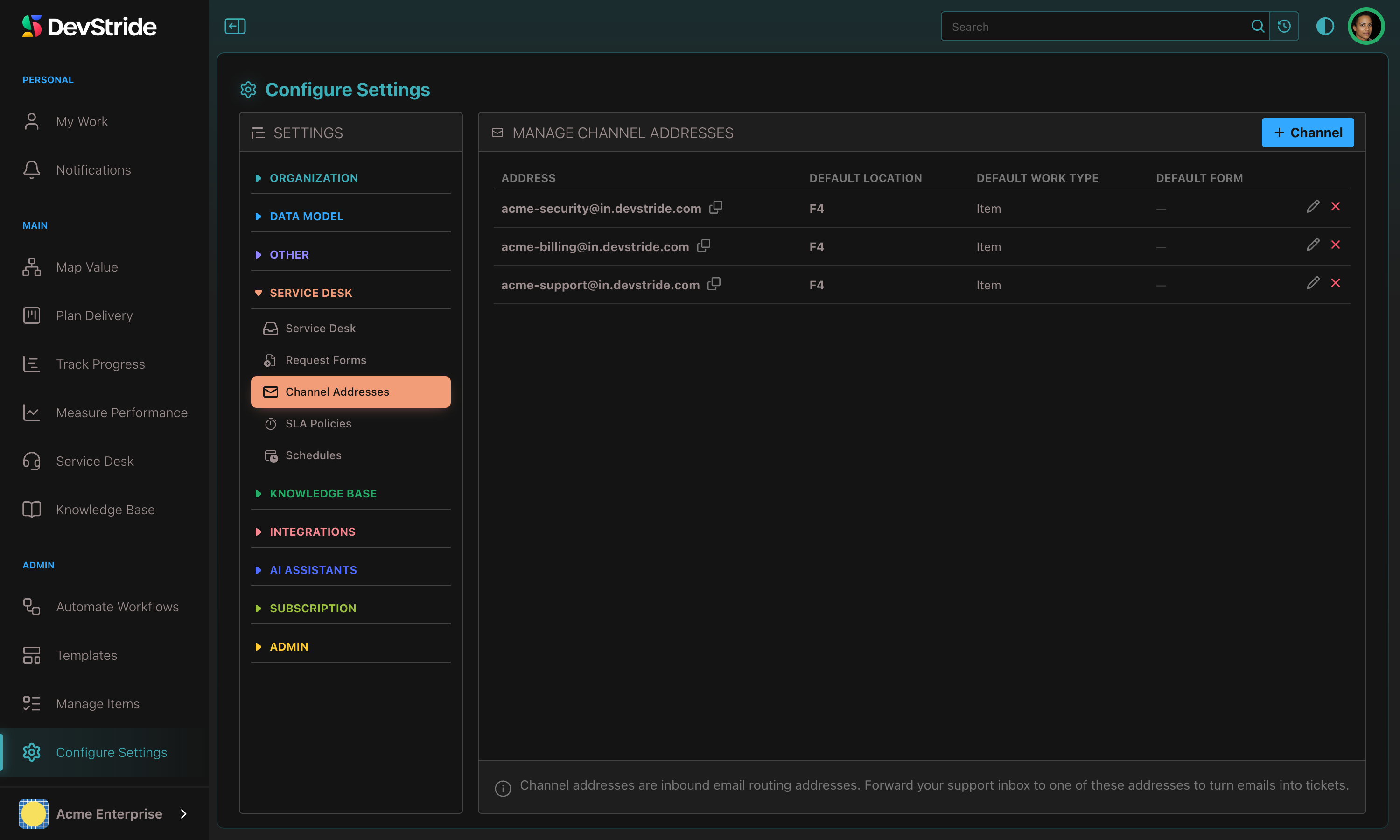
Open Settings → Email → Inbound addresses and click + Channel.
Inbound addresses sit in their own Email group in Settings, beside Sending domains, because they serve every customer conversation: tickets and replies to article comments alike. Links to the old Service Desk location still open the page.
-
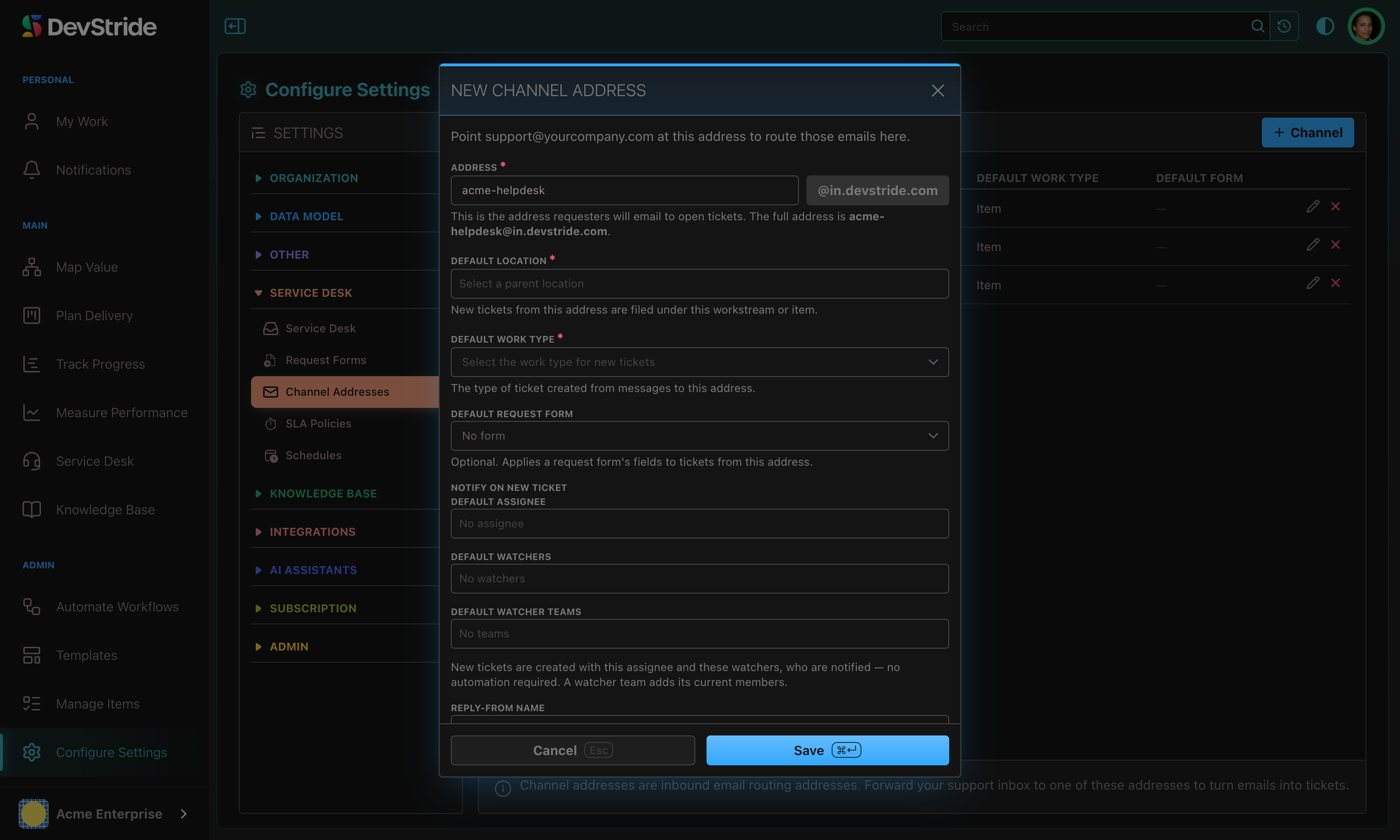
Fill in the New channel address dialog and Save.
-
Back on the list, click Copy address on the new row.
-
In your mail system (Gmail, Microsoft 365, a Google Group), add a forwarding rule from your support address to the copied address.
-
Send a test email to your support address and watch it appear in Service Desk → Inbox.
The fields#
| Field | What it does |
|---|---|
| Address (required) | The part before the @. DevStride appends its inbound domain, for example acme-support@in.devstride.com. Lowercase letters, numbers, dots, and hyphens. |
| Default location (required) | The workstream, folder, or item new tickets from this address are filed under. |
| Default work type (required) | The work type new tickets are created as. |
| Default request form | Applies a request form's field set to tickets from this address. Leave as No form to skip. |
| Notify on new ticket | A Default assignee, Default watchers, and Default watcher teams applied to every new ticket from this address. |
| Reply-From name | The sender name customers see on emails from this address, such as Acme Support Team. Use a team or inbox name rather than a person's name, which mail filters may flag. Blank means "{your organization} Support". |
| From address | The address customer emails are sent from. Leave it on Shared address (in.devstride.com) to send from the channel address itself, or pick a mailbox on one of your verified sending domains. Replies come back through in.devstride.com either way. |
Addresses are unique across all of DevStride
A bare
support@in.devstride.comis almost certainly taken. Include something specific, likeacme-support. DevStride checks availability as you type and suggests a free address.
Edit an address#
Click the pencil on a row to change its defaults, Reply-From name or From address. The address itself is fixed once created, because mail is already routed to it. Changed defaults apply to future tickets only.
How an email becomes a ticket#
Every message to a channel address is checked, then handled one of three ways: it becomes a ticket, it joins an existing ticket, or it is held or turned away.
A new request creates a ticket, whoever sent it, including a member of your own organization:
- The subject becomes the title and the body becomes the ticket's Customer description.
- The sender becomes (or is matched to) a requester, unless a colleague opened it for a client they copied. The ticket's company is the one whose email domain they wrote from, otherwise their main company.
- The address's Notify on new ticket defaults are applied, and the requester gets a "we have received your request" email.
- Attachments are saved to the ticket's Assets tab in an Email Attachments group and linked beside the message that carried them. Inline images render in place. Every attached file is kept, whatever its type. A file that could open as a web page, such as an HTML, XML or SVG file, is saved as a download, so it never opens inside DevStride. Only empty files, files over 10 MB and attachments past the tenth on one email are skipped.
People the customer copied on the email can join the ticket too (below).
Mail that is not a request is handled without opening a ticket:
- Out-of-office replies, delivery-failure notices, spam, and mail that fails sender checks go to the Held for review tab.
- Viruses and exact duplicates are dropped. A duplicate resent within 15 minutes by a mail program that omits a message identifier joins the first ticket instead of opening a second.
- Everything that didn't become a ticket is listed on Rejected mail.
Some senders get no automatic emails. Newsletters and mailing-list mail still become tickets, but DevStride skips the acknowledgement. The same goes for a no-reply address (noreply, donotreply, no-reply and similar): the ticket is created, but no acknowledgement, form confirmation, or status-change email is sent. A reply your team writes is still sent.
Limits
DevStride stores up to 100,000 characters of an email; a longer one is cut and marked so on the ticket and in the portal. Inbound mail is accepted whether or not the sending server encrypts the connection; everything is scanned for spam and viruses either way.
People copied on a customer's email#
When a customer writes to the desk and copies other people from outside your organization, those people are copied on the ticket, so your replies reach them and their replies join the conversation. This works for a customer's new request and for their replies to it.
DevStride copies people from an email only when:
- the email positively passed DMARC, because the desk will then email the people it names;
- it is not a mailing-list delivery, such as a Google Group in front of your desk;
- it landed on the ticket as a customer message, not as an internal note.
Even then, some addresses on the email are never copied:
- members of your organization, who follow a ticket as watchers;
- the desk's own addresses, and any address on your organization's own email domain (the domains your members' addresses use, other than public webmail), so your forwarding inbox is never copied. The cost is that an internal help desk, whose customers share your domain, copies nobody from email;
- your team's own mailboxes;
- no-reply addresses;
- the ticket's requester;
- blocked or erased requesters, including anyone erased after the email arrived;
- anyone taken off the ticket when it was moved to another customer (see changing a ticket's requester).
Copying stops quietly once the ticket copies ten people. Someone new becomes a requester. The customer vouches only for their own address, so a known contact is copied exactly as they are and is never confirmed by the customer's email.
How replies thread onto a ticket#
You don't manage threading. DevStride reads the email's threading headers and recognizes a reply to a ticket's email, so a customer who simply hits Reply lands on the right ticket. That also covers a conversation that never went through DevStride: when you and a customer reply-all with the channel address copied in, each reply joins the ticket the conversation started on.
When DevStride matches by these headers, only the ticket's requester, someone copied on it, or a member of your organization whose mail passes your domain's sender checks, can add to a ticket. Anyone else who replies this way gets a ticket of their own, unless their message also carries the ticket's reply address or subject tag. How email replies find their ticket lists every check in order.
When you send a Reply to customer from a ticket, it is emailed to the requester, with everyone copied on the ticket on Cc, and threaded so their next reply comes back to the same ticket. Quoted "On such-and-such date you wrote…" trails are stripped, so each comment shows only the new text.
Replies to a closed ticket open a new one
A reply to a ticket in a status mapped to the Closed customer status (or to an archived ticket) doesn't reopen it. DevStride creates a new ticket for the reply, keeps the original's company, and links the two as related items. See customer statuses.
When someone on your team emails or forwards a message in#
Your own team's mail reaches the channel address too. Every such email opens or joins a ticket; what DevStride works out is who the request belongs to and what the customer should see.
Mail from someone on your team#
A fresh email from a member of your organization creates a ticket like any other. The colleague is its requester, receives the acknowledgement, and the ticket queues in the Inbox. If it copies a client, it can open the ticket for that client instead (next section).
Opening a ticket for a client by email#
Write a new email to the channel address with a client on To or Cc, and DevStride opens the ticket for the client rather than for you:
- The client becomes the requester. A client already on file keeps the name you have for them; a new one is added under the name your email gives them (or their address), with no confirm-your-address email, because you vouched for them.
- You are added as a watcher.
- Every other outside person on the email is copied on the ticket, up to ten. You vouch for them as you do for the client. A blocked or erased one is skipped.
- The subject becomes the title, which the client sees. Your email's text becomes the ticket's Internal description and is never shown to the client in DevStride. (They have your email already, because you copied them.)
- The client gets one email, in your organization's name from the desk address: We opened a request for you, with the title, saying your team will follow up there. Your text is not in it.
The client is the first outside person on To, or, when nobody outside is on To, the first on Cc. So address the person the ticket is for and copy the rest.
DevStride does this only when all of these hold:
- The email positively passed DMARC, because DevStride will email the client on the strength of who sent it.
- You hold both Manage Requesters and Create Items and Workstreams, the permissions New ticket needs.
- At least one outside address is left on To and Cc once the desk's own addresses, members of your organization, addresses on your organization's own email domain, and no-reply addresses are set aside. Copying colleagues as well is fine.
- That client is not blocked or erased.
- The email is not a forward credited to its original sender (below), and does not join an existing ticket.
Otherwise the ticket is created as before, with you as its requester, and the client is not emailed. The same feature is in the Inbox as New ticket.
Replying to a customer with the channel address copied#
When you answer a customer from your own mailbox with the channel address in Cc, your email is added to the customer's ticket:
- Customer in To or Cc: it appears as your public reply. They already have it, so it isn't emailed again.
- Customer not on it (colleagues talking with the support address copied): it is added as an internal note.
- A reply to a notification about an internal note is always kept internal, even if other references are public. If DevStride can't tell what you replied to, it fails safe and keeps the note internal.
A forwarded customer email#
When a colleague who may open tickets for clients forwards a customer's message to the channel address, DevStride credits the ticket to the customer:
- The original sender becomes the requester and receives the acknowledgement.
- The ticket takes the original subject and body, so the title reads as the customer wrote it.
- The colleague who forwarded it is added as a watcher.
- Whatever the colleague wrote above the forward ("can someone pick this up?") becomes an internal note.
Forward a customer's reply into an existing ticket and the same split applies: the customer's words are published as a comment from them, and the covering note stays internal. Adding a reply to the customer's own ticket opens nothing new, so it needs no extra permission (see staff forwards). If that same email is already on the ticket and the ticket is still open, it is not published a second time: see the next section.
When the same email is forwarded more than once#
Two colleagues often forward the same customer email, or a colleague forwards something the customer also sent to the desk directly. The customer still gets one ticket and one acknowledgement. The later forward joins the ticket already open:
- No new ticket opens, no second acknowledgement goes out, and nothing is published to the customer.
- The ticket gains an internal note reading Forwarded by and the colleague's name, followed by anything they wrote above the forward.
- The colleague is added as a watcher, and any files on the forward are kept as staff-only attachments.
DevStride treats two emails as the same when they come from the same customer with the same subject and the same opening text. The forward joins only a ticket opened in the last 14 days that is not solved, closed or archived, and only if that forward is credited to the customer (below). Otherwise it follows the usual rules, which can mean a new ticket. An email with no text, such as an image on its own, never matches, and tickets opened before 9 November 2026 can't be matched.
When a forward is credited to the forwarder instead#
Putting a stranger on your requester list and emailing them is worse than crediting nobody, so DevStride credits a forward to the original sender only when all of these hold:
- The colleague who forwarded it holds both Manage Requesters and Create Items and Workstreams, the permissions New ticket needs, because crediting a forward opens a ticket for a client. The Owner always qualifies. The default Member role lacks Manage Requesters, so a Member's forward opens the ticket with the Member as its requester; give support staff the Service desk agent permissions or the Admin role if their forwards should be credited to the customer.
- The message positively passed DMARC. A domain with no DMARC record produces neither pass nor fail, so its forwards are never credited even though they pass the usual sender checks.
- The subject carries a forward prefix: Fwd:, FW:, or a localized equivalent.
- It carries one original message, not several.
- The address inside is an outside customer: not a channel address, not a current member of your organization, and not a requester you have erased, blocked, or merged away.
If any check fails, the ticket is still created, but the forwarding colleague is the requester and the forwarded text is kept internal. Glance at the Requester pane before replying and change the requester if needed.
Forward as attachment to publish the customer's words
Only a forward that carries the original as an attached message (Forward as attachment in most mail clients) has its body published as the customer's. In an ordinary inline forward the customer is still credited, but the text is kept internal, because staff remarks can be woven through a quoted trail and there is no safe way to separate them.
If forwards are never credited, check your own DMARC first
Crediting needs an explicit DMARC pass on the forwarding colleague's mail. If your team's forwards consistently land under the forwarder, confirm your sending domain publishes a DMARC record before looking anywhere else.
When the customer wrote to a Google Group or mailing list#
A shared address like support@yourcompany.com is often a Google Group, which rewrites the sender to "Dana Whitfield via Support" <support@yourcompany.com>. When a colleague forwards such a message in, DevStride credits the real person, using the list's own record of the original sender in the headers, or otherwise the one outside address in the forwarded text spelled from their name (for example dana.whitfield@…). Two or more candidates are ambiguous and none is used; the forwarder becomes the requester instead. The group's own address is never made the requester, so acknowledgements never go to a whole list.
Your team's own mailboxes#
Your support inbox, such as support@yourcompany.com, often writes to the desk as well as forwarding to it. List it so the desk treats it as your team and not as a customer. With nothing listed, nothing changes.
Open Settings → Email → Inbound addresses, go to Your team's own mailboxes, enter the full address and click Add. You need Manage Service Desk Settings. A listing counts for every channel address in your workspace, and training sandboxes don't copy the list.
You can list up to 20 mailboxes, one full address each; whole domains aren't accepted. The list refuses a channel address, a no-reply address, an address that can't receive email, a member's email, and anything already listed. A channel address's custom From address already counts as your own, so it doesn't need listing.
What happens to mail from a listed mailbox#
| The email | What DevStride does |
|---|---|
| A reply on an existing ticket | It joins the ticket like a colleague's reply, including a reply-all with the desk on copy. It's public when the customer is on the email, and the customer isn't sent it again. Otherwise it's internal, and anything unclear stays internal. |
| A forward carrying a customer's original | It opens a ticket in the customer's name. A repeat of a forward that already opened a ticket joins that ticket. |
| Anything else | It waits in Held for review as From your own mailbox, no customer found. No ticket opens and nobody is emailed. |
These rules apply only when the email positively passed DMARC and came straight from the mailbox. An email that fails that check, or that was delivered through a mailing list such as a Google Group, is treated as ordinary customer mail, so a forged address gains nothing.
What a listed mailbox no longer receives#
- The desk sends it no automatic customer email: no acknowledgements, status changes or satisfaction surveys, whether it's the requester or copied on the ticket. Desks that send their own email through a webhook follow the same rule.
- It can't be copied on a ticket or set as a ticket's requester.
- A reply a colleague deliberately sends is unaffected.
Existing tickets stay as they are. If a mailbox was already recorded as the requester on older tickets, those tickets keep it, but its automatic email stops once it's listed. Removing a mailbox affects later mail and later events only.
Removing a channel address#
Click the x on a row and confirm:
Remove {address}? Inbound email to this address will stop creating tickets. Existing tickets are unaffected.
- New mail to that address stops becoming tickets immediately.
- Existing tickets, conversations, and requesters are untouched.
- Late-arriving mail is dropped cleanly and recorded on Rejected mail as Support address was removed. No stray ticket or phantom requester is created.
Removing vs. disabling
Remove a channel address to retire one support address. Disable Service Desk only to switch off the whole module.
Where a ticket actually lands: location overrides#
The address's Default location is the baseline. Two things override it, in this order:
- A Default request form. An address with a request form files its new tickets through the form: the form's location and work type are used, and the address's own location is not. If the form has been deleted, or has a required field with no usable default, the ticket falls back to the rules below so it is still created.
- A company default location. If the requester's company has one, tickets from that company are filed there instead. The address's work type is used either way; a company override changes the where, not the what.
A ticket your team opens for a client, from New ticket or by email, follows the same rules, so it lands where that client's own email would.
If a company's location has since been archived or deleted, DevStride falls back to the channel address's default. A ticket is never dropped because a destination is missing.