
Export
Export Weekly Logs entries for a date range to CSV, filtered by people, workstreams, and custom fields, for billing and reporting.
On this page
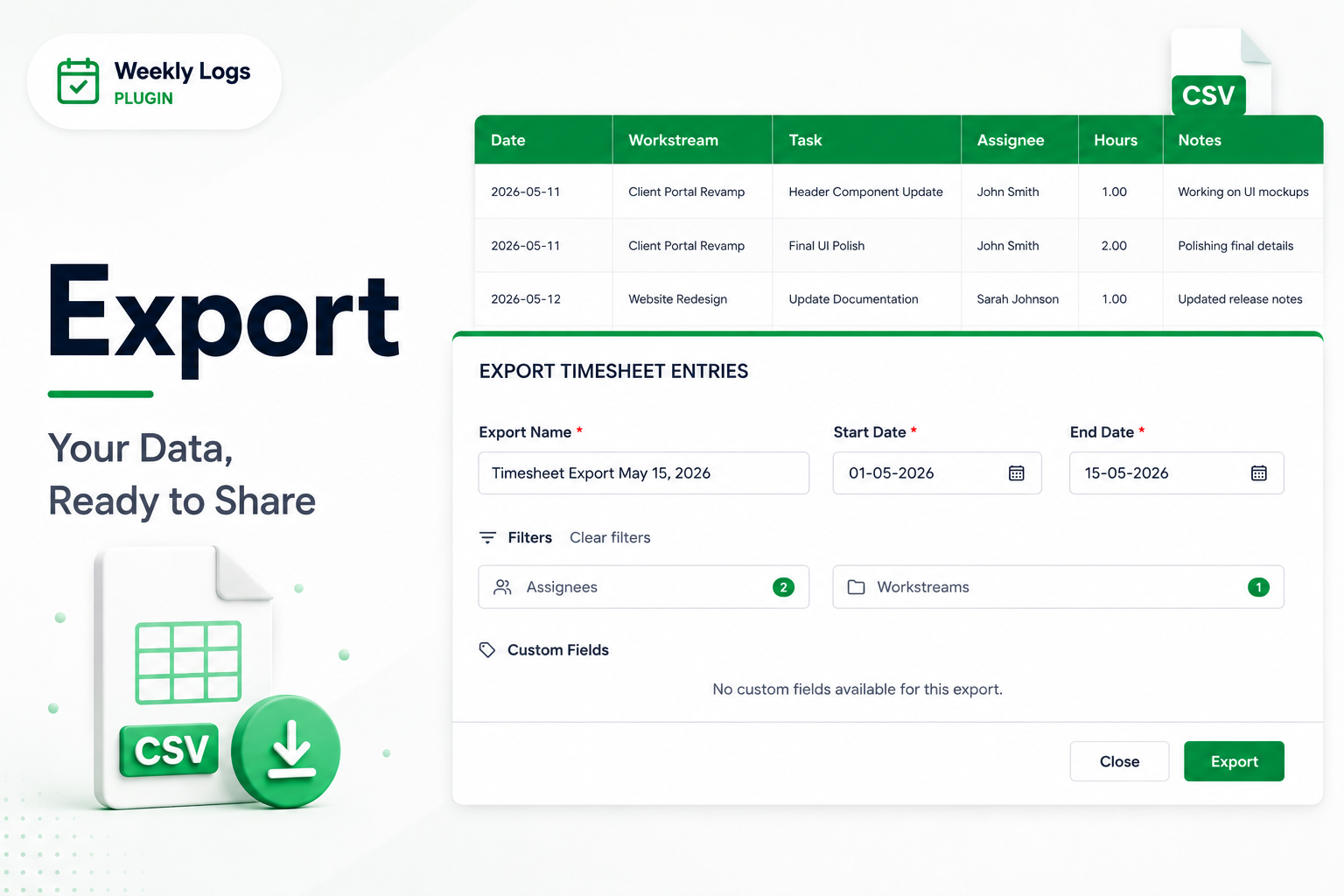
Export when billing or reporting is due. The export covers a date range you choose, not just the week on screen.
Availability
Export works in My Logs and Team Logs. It is disabled in All Orgs — switch to one organization first.
Export a CSV#
- Click Export in the header.
- Name the file. The default is Timesheet Export followed by today's date.
- Set the start date and end date. The default is the first of the current month to today; the range can span up to one year.
- Optionally filter:
- Assignees — only these people's entries.
- Workstreams — only entries under these workstream paths.
- Custom Fields — add the selected fields as extra columns.
- Click Export. The CSV downloads, ready for Excel or any reporting tool.
What is in the file#
One row per time entry:
| Column | Description |
|---|---|
| Date | The day the time was logged |
| Full Name | Who logged it |
| Workstream Path | The workstream hierarchy the task sits in |
| Task ID | The item number, such as I123 |
| Task Name | The item title |
| Work Item Type | Feature, Story, Bug, and so on |
| Custom Fields | Any fields you selected |
| Hours | Hours on that entry |
| Notes | The entry's description, if any |