
Basic Terms
The DevStride glossary — one-line definitions of every term you will meet in the product, from workstream and item type to cadence, WIP limiter, and MCP server, each linked to its full page.
On this page
One line per term, grouped by where you meet it. The six core terms come first; the rest is reference.
Core concepts#
Workstream#
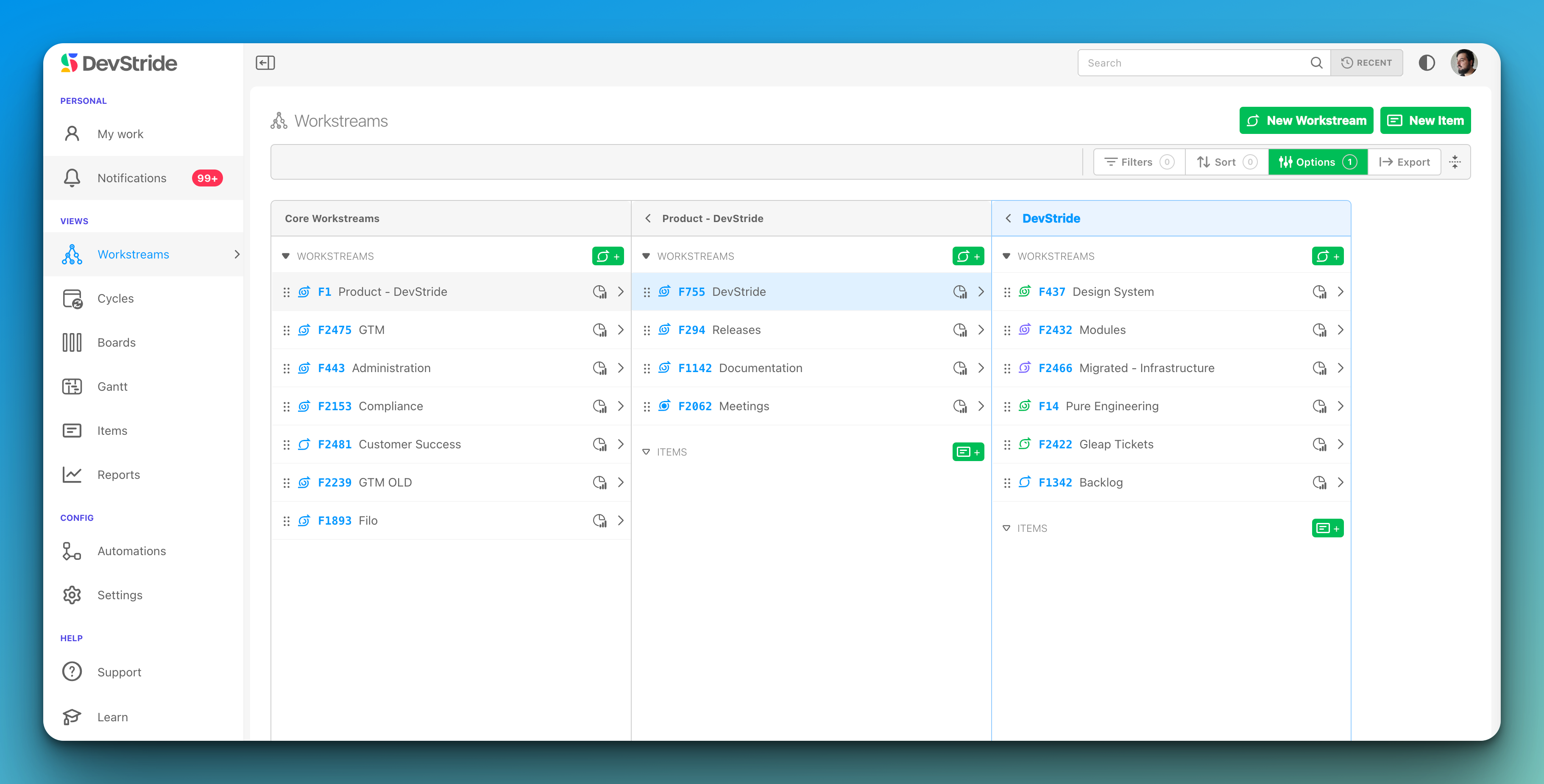
A container in Map Value for what you deliver (a product, initiative, client, or function). Top-level ones are core workstreams; they nest, and sub-workstreams roll up to their parents. No dates; it is where work lives. Understanding Workstreams
Work Item#
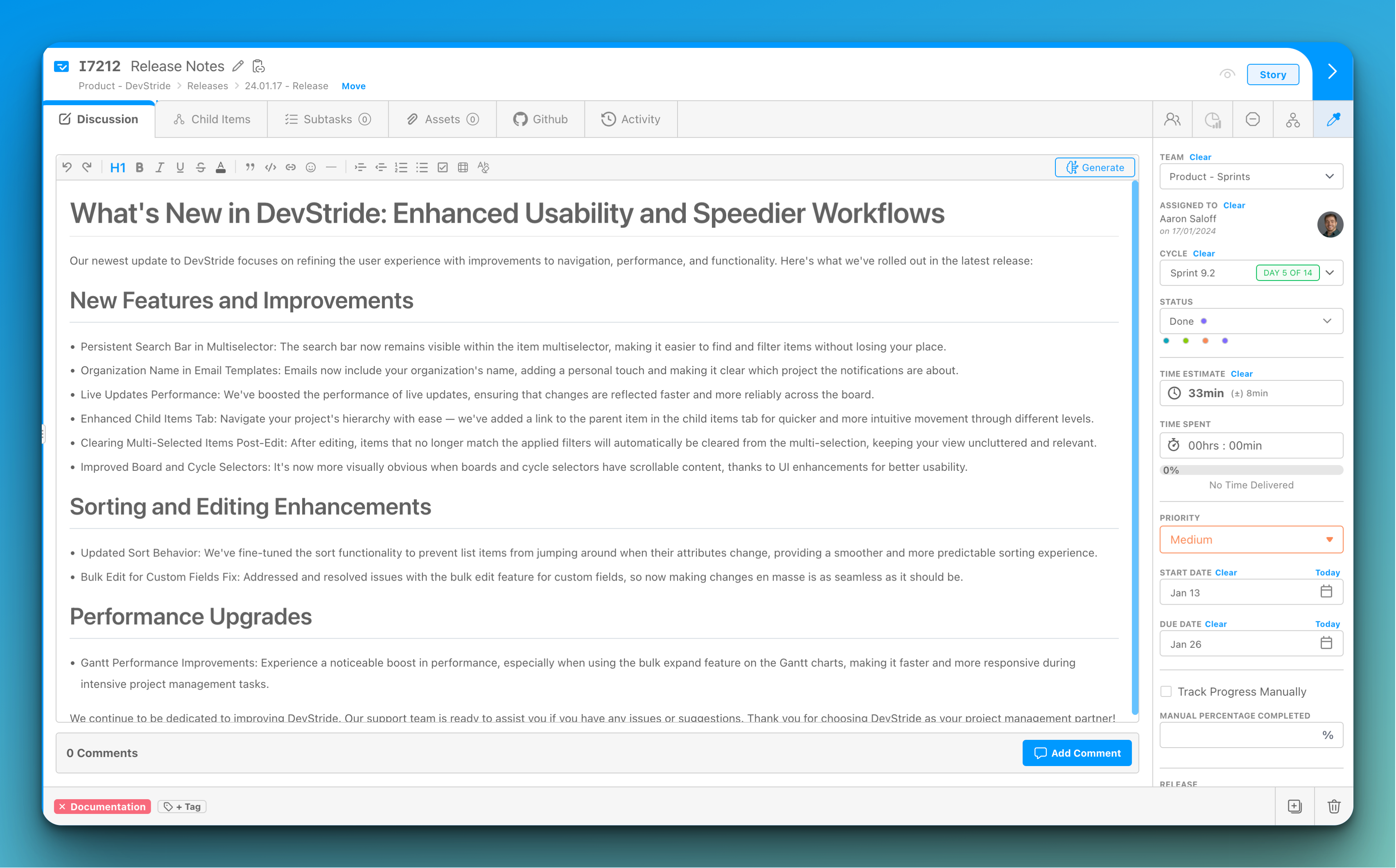
A unit of work inside a workstream with a type, status, assignee, dates, estimates, and fields. Added with the green Item button or the i key wherever items are listed. Creating work items
Workspace#
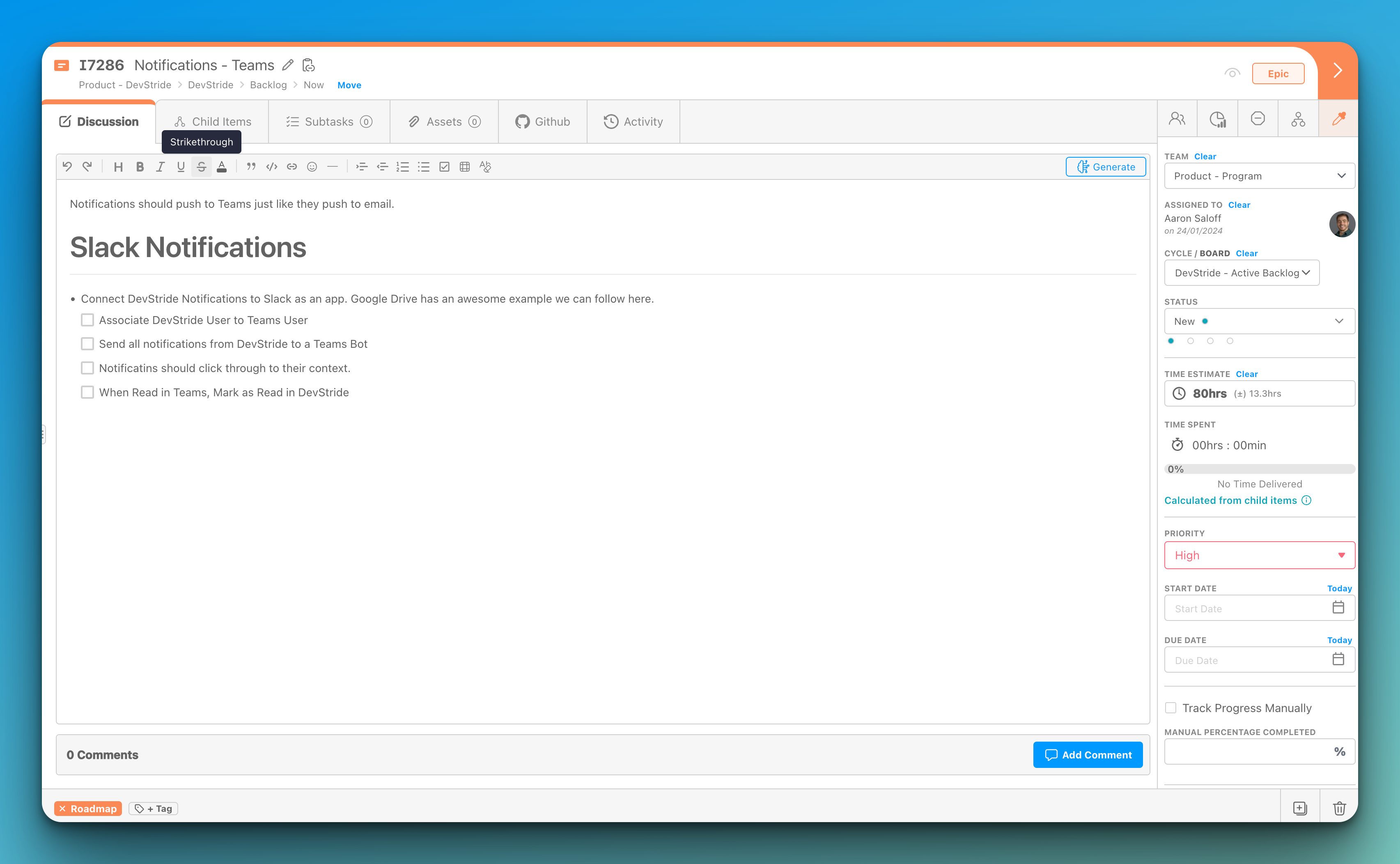
The drawer that opens on an item or workstream: description, discussion, subtasks, children, time, assets, and activity as tabs, with the data fields in the right sidebar. Item Workspace Tour
Cycle#
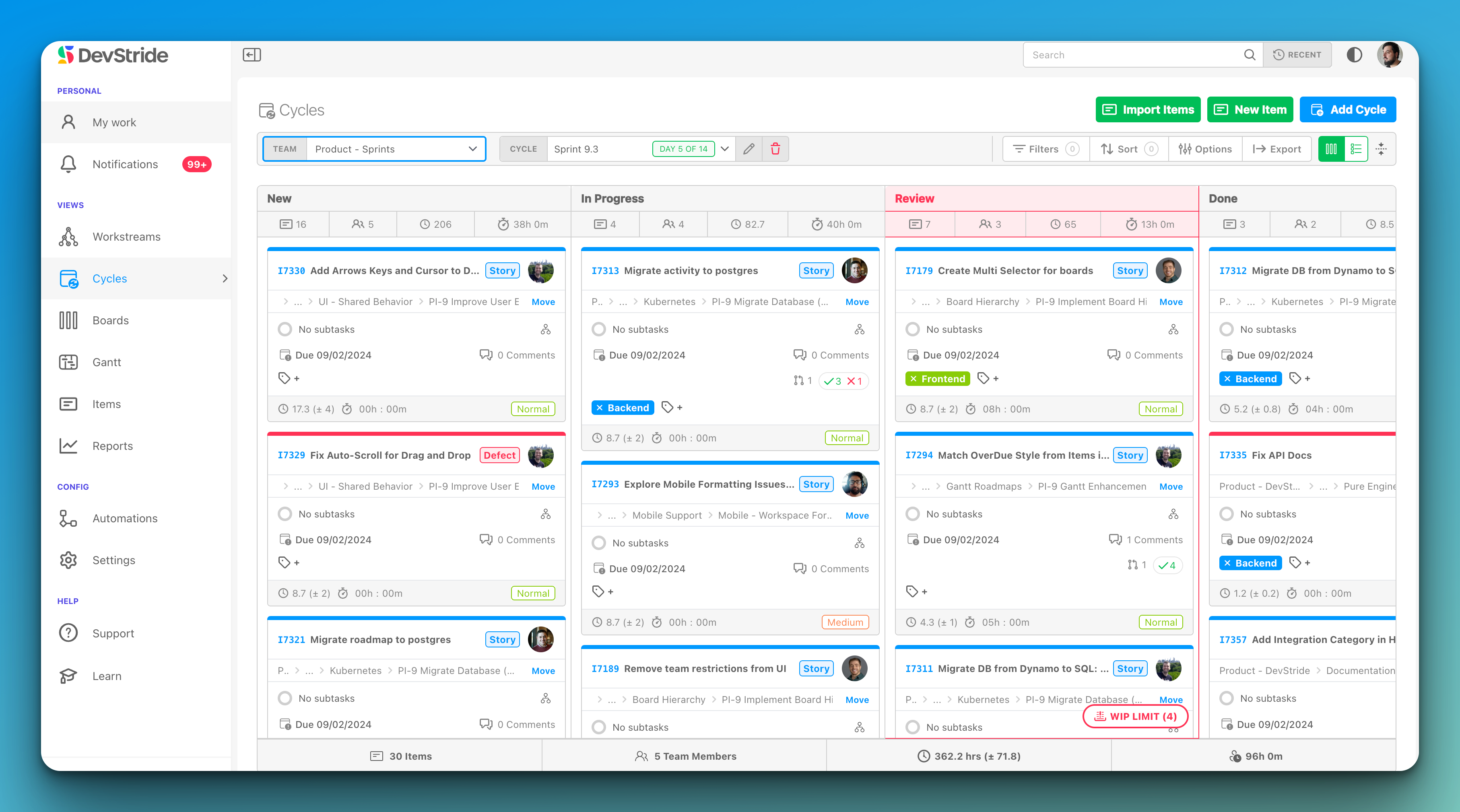
One dated period of a cadence as seen on a cycle board ("Sprint 14"). Items placed on a cycle inherit its dates. Optional: teams can work entirely on perpetual boards. Using cycle boards
Board#
Where a team executes in Plan Delivery: columns are statuses, cards are items, with Status, Table, and 2D views. Perpetual boards run indefinitely; cycle boards run on a cadence. How DevStride manages the When
Gantt#
The timeline view in Track Progress: items plotted by start and due date, with dependencies, milestones, and drag-to-reschedule. Gantt chart basics
Modules (the left navigation)#
| Term | Definition | More |
|---|---|---|
| Map Value | Portfolio view of workstreams and their item hierarchy | Using the Map |
| Plan Delivery | Folders and boards where teams execute | Working Group Folders |
| Track Progress | Gantt charts | Setting up Gantt charts |
| Measure Performance | Reports: progress, velocity, cycle time, throughput, churn, time | Measure Performance |
| Automate Workflows | Rules that react to events and take actions | Setting up automations |
| Manage Items | Cross-organization table of every item with filters and saved views | Manage Items |
| My Work | Your personal list of assigned items | My Work |
| Configure Settings | Organization, data model, cadences, integrations, billing; Admin and Owner only | Organization Profile |
| My Account | Your profile, password, MFA, notifications, API keys | My Account |
Structuring work#
| Term | Definition | More |
|---|---|---|
| Item Type | The level an item occupies (Epic, Story, Task) and what may nest under it; a type can have several parent types | Item Types |
| Dual Hierarchy | The same item seen by value (workstream tree) and by delivery (folder and board tree) | Working Group Folders |
| Folder | A Plan Delivery container for a working group's boards; nests and passes permissions down | Working Group Folders |
| Child Item | An item nested under another item; has its own status, assignee, estimates, and rolls up | Item hierarchy |
| Subtask | A checklist line inside an item; not an item, not in most reports | Workspace tabs |
| Custom Field | Data you add to items, grouped in collections per item type | Custom Fields |
| Collection | A named group of fields, tags, statuses, priorities, or estimate ranges assigned to item types (or, for statuses, to boards) | Custom Fields |
| Tag | A coloured label for attention or grouping; Bug and Blocked are reserved | Tags |
| Priority | A ranked level from a per-type collection, with a default | Priority Levels |
| Dependency | An item this one is blocked by | Dependency graph |
| Dependent | An item this one blocks | Manage dependencies |
| Related | A reference link between items with no scheduling effect | Manage dependencies |
| Blocked | A flag with a reason that an item cannot move; shows everywhere the item appears | Quick links |
| Template (item) | A reusable item tree applied from the Templates module | Templates |
| Import Template | An Excel workbook that creates a branch of workstreams and items | Import templates |
Workflow and Boards#
| Term | Definition | More |
|---|---|---|
| Status | A stage of work; a board column. New is always first and Done last | Item Statuses |
| Status Collection | The ordered statuses a board uses as columns | Item Statuses |
| WIP Limiter | A cap on items in one status; the board flags the column when exceeded | Boards & WIP limiters |
| Cadence | A rule for repeating periods ("every 2 weeks") that generates timeboxes; cadences nest | Cadences |
| Timebox | One dated period generated by a cadence | Setting up cadences |
| Cycle Board | A board on a cadence; each cycle is a timebox | Cycle boards |
| Perpetual Board | A board with no timebox, for backlogs and continuous flow | Perpetual boards |
| Automation / Trigger | A rule: when an event happens (trigger) and conditions hold, do actions | Setting up automations |
| Link Mode | Date changes cascade along dependency chains | Link mode |
| Milestone | A diamond marker for a key date on a Gantt | Add to a Gantt |
Estimating and tracking#
| Term | Definition | More |
|---|---|---|
| Point Estimate | Relative effort, per team; configured per type as Decimal, Integer, Fixed List, or Disabled | Effort points |
| Time Estimate | Optimistic, likely, and pessimistic hours combined by PERT into an estimate with a ± range | Time estimation |
| Estimation Range | A named preset (T-shirt size) with default hours | Time Estimates |
| T-shirt Sizing | Sizing in buckets (XS to XL) instead of exact numbers; DevStride's presets are the usual home for it | Time Estimates |
| Time Spent | Logged hours; an item's total is its own time plus its descendants' | Time Spent |
| Time Tracking Lock / Soft Close | Cutoffs after which logged time is uneditable or flagged late | Time Tracking Lock |
| Progress Rollup | Percent complete computed from direct children; can be overridden | Progress Tracking |
People and access#
| Term | Definition | More |
|---|---|---|
| Role | Organization-wide permissions: Owner, Admin, Member, or custom | Roles & Permissions |
| Sharing | Per-object access (Viewer, Commenter, Editor, Owner) on an item, workstream, board, or folder | Sharing & Access |
| Team | A working group items and boards are assigned to; people can be on several | Users and Teams |
| Persona | A job function (Engineer, QA) assignable alongside or instead of a person; no permissions | Personas |
| Assignee | The one person responsible for an item (Assigned To) | Team through Status |
| Watcher | Someone notified of changes to an item | Notification options |
| User Label | A marker on a member (Contractor, Vendor) for filtering the Users table and User Picker fields | Users, Roles & MFA |
| Enterprise SSO | Signing in through your company's identity provider | Enterprise SSO |
Finding work#
| Term | Definition | More |
|---|---|---|
| Filter | Narrow a list by status, team, priority, tag, field, and more | Finding & filtering items |
| View (Stored View) | A saved filter, sort, and column set; private, shared, or published | Creating & sharing views |
| Search | The box at the top of every screen, also opened with Cmd/Ctrl + K: your recent places, and search across pages, items, workstreams, boards, cycles and Gantts |
Search & Recent Places |
Reporting#
| Term | Definition | More |
|---|---|---|
| Throughput | Items completed per period | Throughput |
| Velocity | Points completed per cycle | Velocity |
| Cycle Time | Time from start to Done | Cycle Time |
| Burn Up / Burn Down | Completed or remaining work against a target over time | Burn up · Burn down |
| Churn | Work added, removed, or reopened mid-plan | Churn |
| Cycle Carry Forward | Work that moved from one cycle to the next | Cycle Carry Forward |
| Current Progress | Complete versus remaining at a point in time | Current Progress |
Intake and integration#
| Term | Definition | More |
|---|---|---|
| Item Request Form | A private or public form whose submissions become items | Item Request Forms |
| Service Desk | Tickets from email and forms, with requesters, SLAs, and a customer portal | Service Desk |
| Shared List | A read-only item list shared with customer companies through the portal | Shared lists |
| Knowledge Base | Articles for your team and customers | Knowledge Base |
| API Key | A personal credential for programmatic access with your permissions | API keys |
| MCP Server | Lets AI assistants (Claude, ChatGPT, Cursor) work in DevStride on your behalf | DevStride MCP server |
| Plugin | An add-on module such as Weekly Logs | Plugins |